
QR ordering and a restaurant dashboard
Your menu, your orders, one system.
Ordery gives a restaurant a QR menu its customers can order from, and the tools to run what happens next — menu, locations, orders and, where a till is connected, the counter itself.
Creating an account is free. A subscription is chosen and paid for separately.
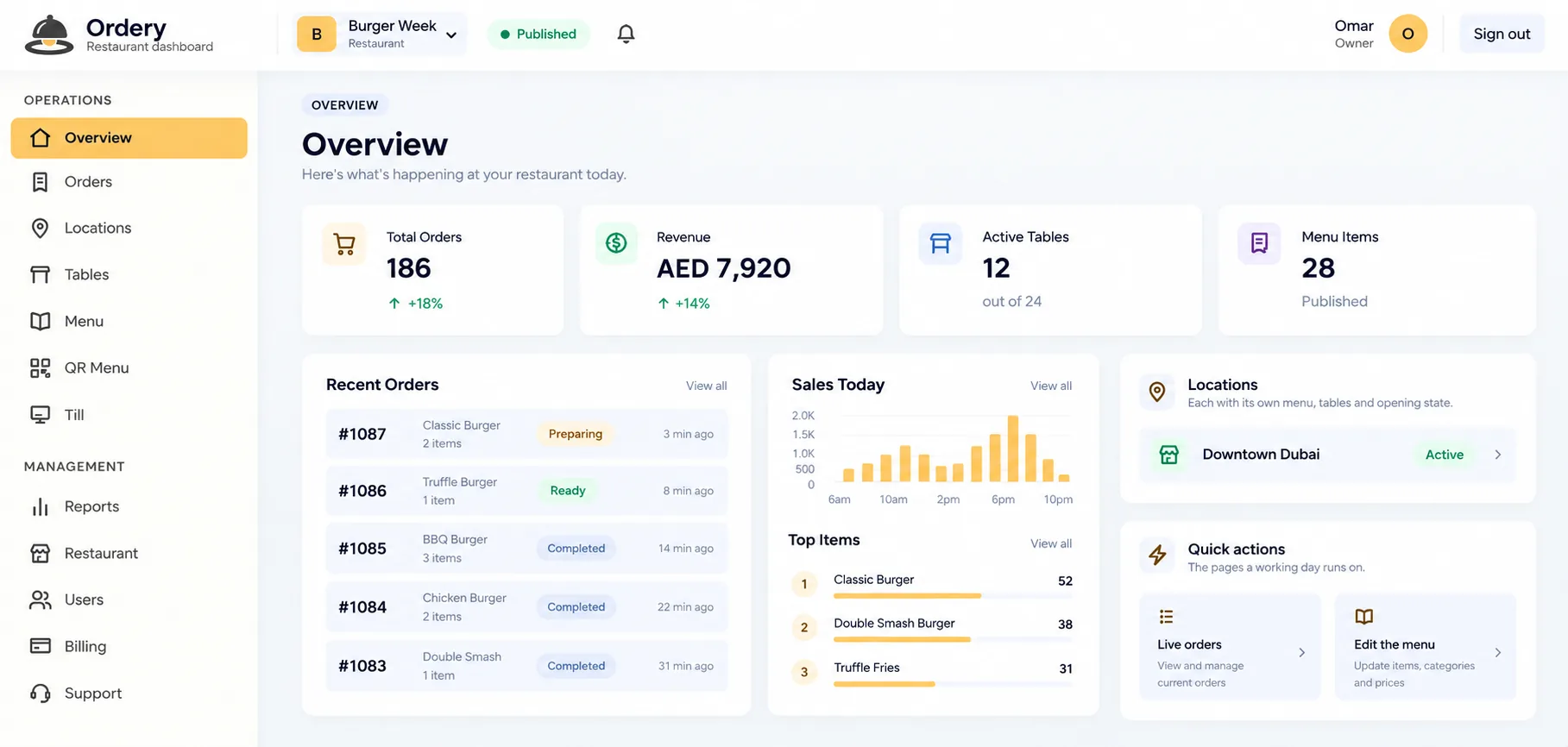
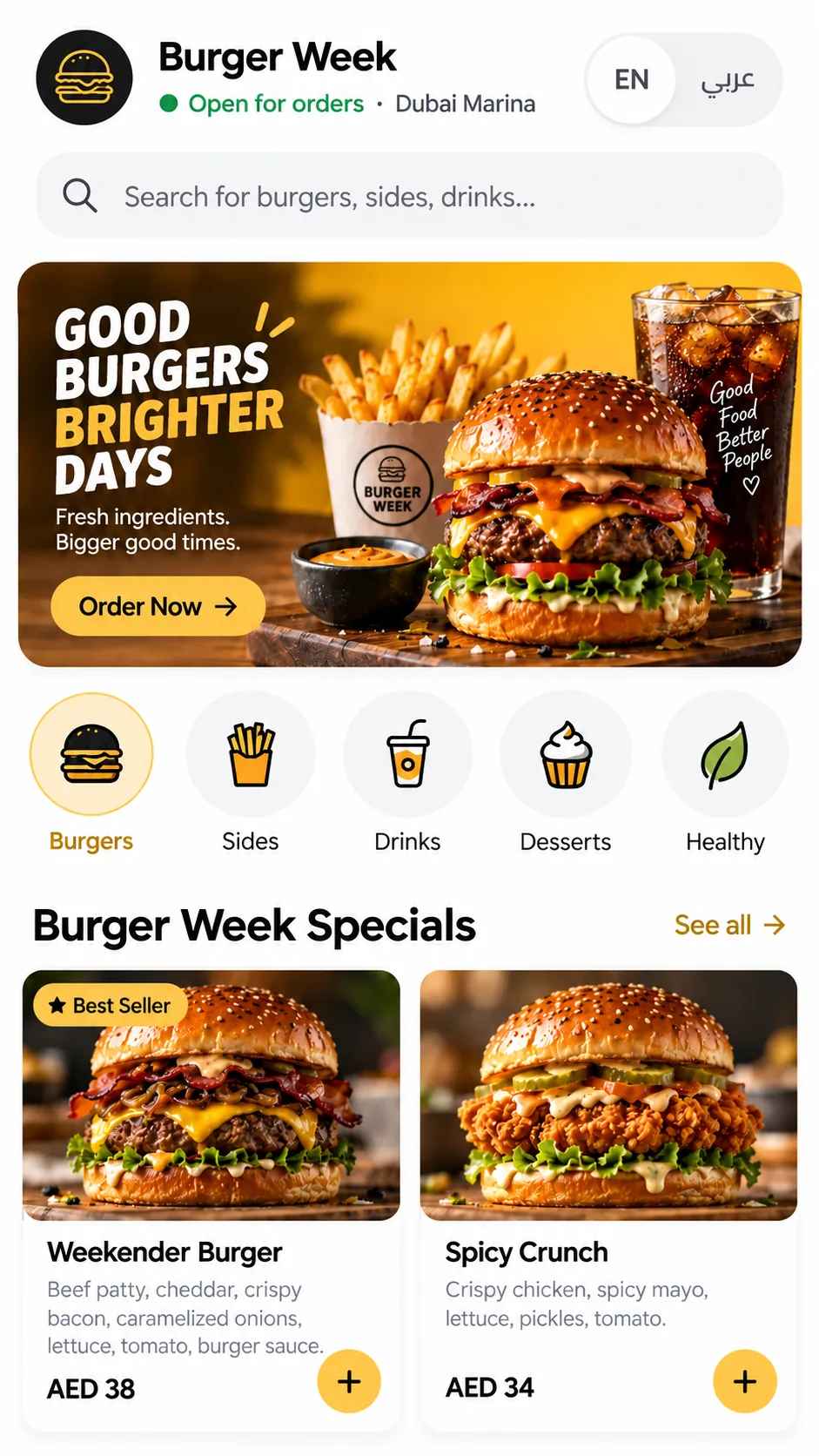
Ordered from the table, read in the dashboard
For your customers
Ordering that feels natural
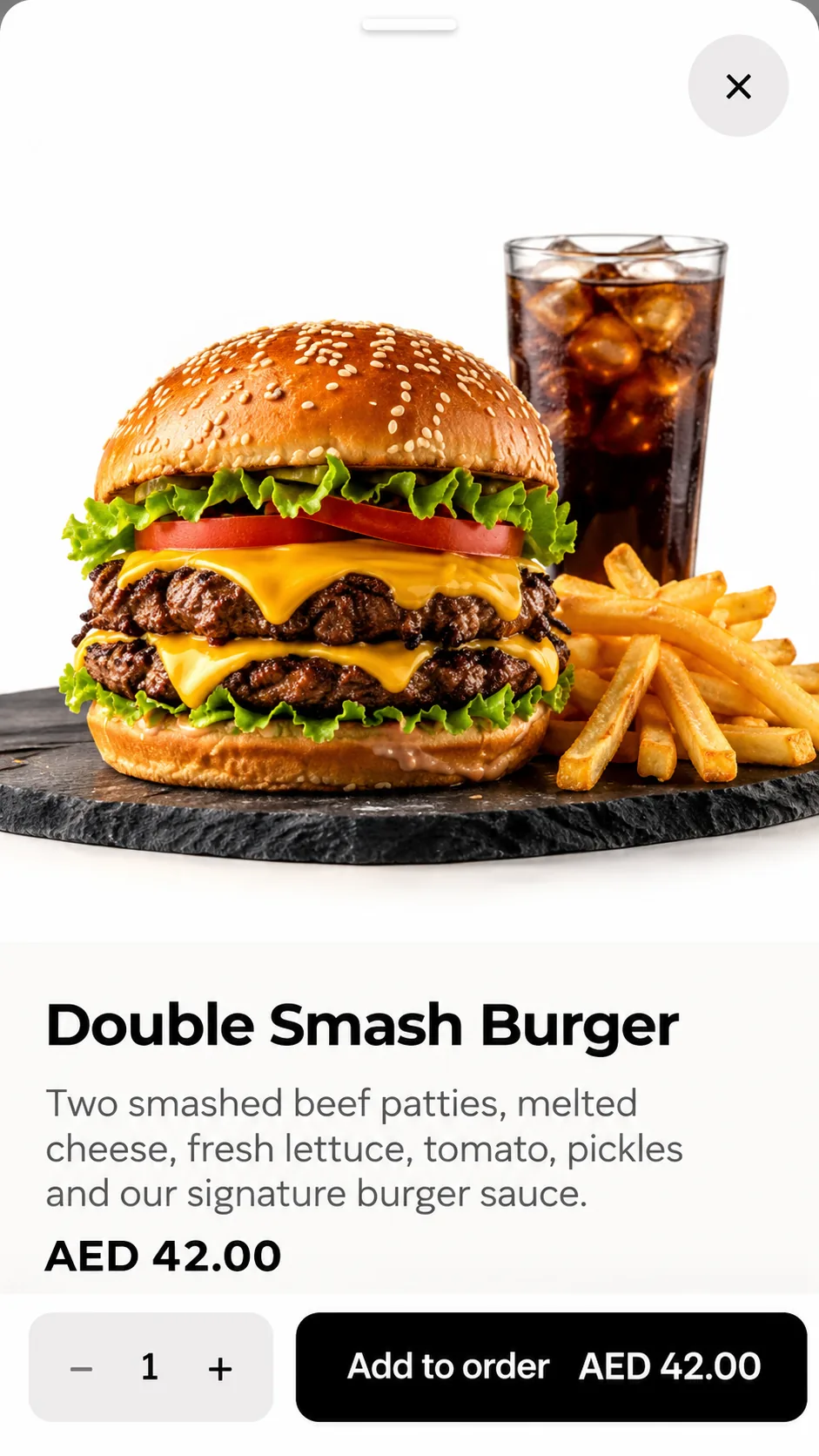
A customer points their camera at the code on the table and your menu opens in the browser they already have. They browse, choose sizes and extras, and send the order.
- No app to install and no account to create before ordering.
- Photographs, sizes and option groups, in English and Arabic.
- At a table, or for collection and delivery where you offer them.
- Prices and availability follow the location the code belongs to.
For your restaurant
Run your restaurant from one place
Write the menu, set your branding, manage locations and tables, and read the day’s orders — without opening three different systems to do it.
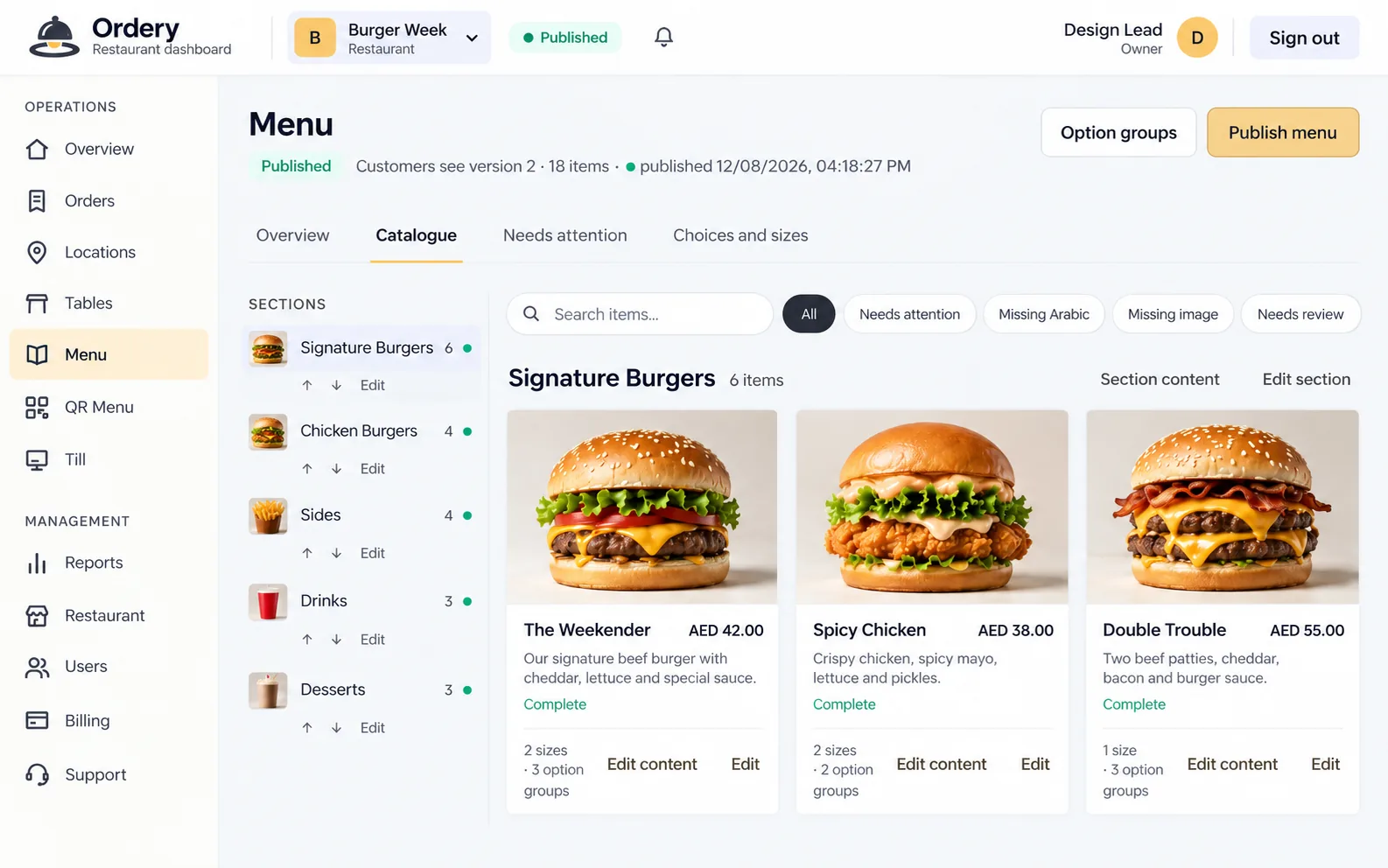
- Sections, dishes, sizes and option groups, published when you are ready.
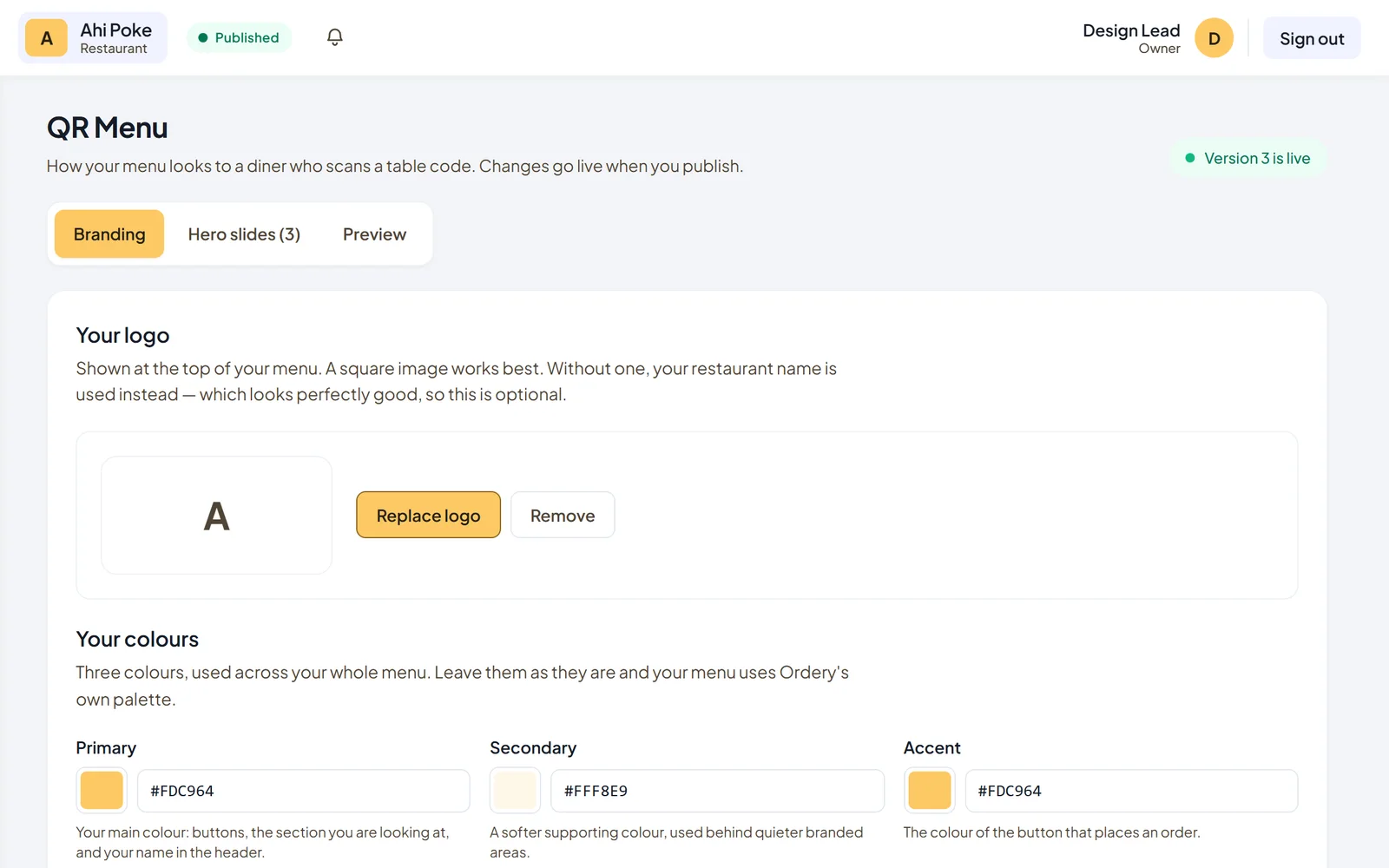
- Your logo and colours on the menu a customer sees.
- Locations, each with its own prices, availability and opening state.
- Tables with their own QR codes, and the day’s orders as they arrive.
See it in action
One system, from the table to the counter
The menu a customer reads, the dashboard a manager works in and the till at the counter share the same catalogue — so what a diner orders and what a cashier rings up cannot drift apart.
- Customer
QR ordering
Scan the code on the table, read the menu, order. Nothing to install.
- Restaurant
The dashboard
Menu, locations, tables, orders and how the QR menu looks — in one place.
- Counter
Ordery POS
A Windows till that keeps trading when the connection does not.
What Ordery does
Built around how a restaurant actually runs
QR ordering and digital menu
A menu on its own web address, opened by scanning a code at a table or on a counter. Photographs, sizes, option groups, English and Arabic with right-to-left handled properly, and prices that can differ by location.
The restaurant dashboard
Where the menu is written and published, where hero images and the logo are set, where tables and QR codes are managed, and where the day’s orders are read.
Works with your till
A connected Ordery POS can own the catalogue — the till publishes it and the QR menu follows — and orders placed for collection or delivery arrive at the counter rather than in a second inbox.
Nothing for customers to install
A diner scans, reads, orders and is done, in the browser they already have. No app, no account and no download stands between them and the menu.
How it works
Three steps to a menu customers can order from
- Step 1
Step 1: Set up your restaurant
Create an account, name your restaurant and add your first location. This is free and does not need a card.
- Step 2
Step 2: Build and publish your menu
Write your sections and dishes, add photographs, set your logo and colours, then publish. Or connect an Ordery till and let it publish the catalogue for you.
- Step 3
Step 3: Customers scan and order
Print the codes for your tables, or share the link. Orders arrive in the dashboard, and at the counter when a till is connected.
Features
What you get
Available now — not planned.
Menu with photographs and options
Sections, dishes, sizes and option groups, each with its own picture and description.
Publish when you are ready
Customers keep seeing the current menu while you edit. Publishing is what changes it.
English and Arabic
Both languages on one menu, with right-to-left layout, chosen by the diner.
Dine in, collection and delivery
Order from a table by scanning its code, or choose collection or delivery from a location.
More than one location
Each location has its own prices, its own availability and its own open switch.
Tables and QR codes
Codes generated per table, so an order arrives knowing where it came from.
Your branding on the menu
Your logo, your colours and a hero carousel — saved in the dashboard, live on the next load.
Orders as they arrive
The day’s orders in the dashboard, and at a connected till.
Sold out, without editing the menu
Mark a dish unavailable at one location and it reads as sold out there, immediately.
Reports on the day
What sold and what it came to, per location.
Ordery POS integration
Pair a till, let it own the catalogue, and keep one menu across the counter and the code.
Subscriptions and device licensing
A plan per account, with the number of tills it covers held against it.
Pricing
Plans
One subscription per restaurant account, paid monthly or yearly. Creating an account costs nothing; a plan starts when you pay for it.
Ordery QR
A complete digital menu and QR ordering experience for modern restaurants.
AED 99.00per month
AED 990.00 billed yearlySave 17%
- Digital QR Menu
- QR Table Ordering
- Restaurant Dashboard
- Menu & Category Management
- Items, Variants & Options
- Product Images
- Arabic & English Menus
- Table QR Codes
- Dine-in Ordering
- 1 Restaurant Location
- Standard Ordery Branding
Ordery Restaurant
Everything you need to run daily restaurant operations, from order to payment.
AED 199.00per month
AED 1,990.00 billed yearlySave 17%
- Ordery Restaurant POS
- Table & Dine-in Management
- Split Bills
- Partial Payments
- Cash, Card & Tips
- Cashier Shifts
- Cash Movements
- End of Shift / End of Day
- VAT & Sales Reports
- Operational Reports
- 1 POS Terminal Included
Ordery Complete
Full restaurant control with POS, back office, inventory and financial management.
AED 299.00per month
AED 2,990.00 billed yearlySave 17%
- Everything in Ordery Restaurant
- Ordery Back Office
- Inventory Management
- Purchasing & Suppliers
- Recipes & Food Cost
- Stock Counts & Adjustments
- Expense Management
- Advanced VAT Reports
- Management Reports
- Remove “Powered by Ordery” Branding
- Priority Support
Prices are what a restaurant pays Ordery for the software. Ordery does not take your customers’ payments for their food.
FAQ
Questions
The things restaurant owners ask before they sign up, answered as plainly as we can. Anything else, get in touch below.
What is Ordery?
Restaurant software for ordering and daily operations. It gives a restaurant a QR menu that customers can order from, a dashboard to run the menu, locations and orders, and an optional till at the counter that shares the same catalogue.
Do my customers need to install an app?
No. Scanning the code opens the menu in the browser they already have. There is nothing to download and no account to create before ordering.
How does the QR menu work?
Your restaurant gets its own web address. Codes printed for your tables open the menu already knowing which table they came from, so an order arrives with its table on it. Customers can also order for collection or delivery from a location, where you offer those.
Can I manage my own menu and how it looks?
Yes. Sections, dishes, photographs, sizes and option groups are all yours to edit, in English and Arabic. So are your logo, your colours and the images at the top of the menu. Menu changes go live when you publish; your logo and hero images take effect as soon as you save them.
What if my restaurant already has an Ordery till?
A connected till can own the catalogue. It publishes the menu and the QR page follows, so the counter and the code never disagree about what is on sale or what it costs. Orders placed for collection or delivery arrive at the counter as well as in the dashboard.
How do subscriptions work?
You create an account first — that part is free and does not need a card. A plan is then chosen and paid for from the billing page in your dashboard, monthly or yearly, through Stripe’s own hosted checkout. Ordery never sees your card details.
Can I cancel?
You can switch off automatic renewal from your billing page at any time, and your plan then runs to the end of the period you have already paid for.
Does Ordery take my customers’ payments?
No. What a restaurant pays Ordery is the software subscription. What a customer pays for their food is between them and the restaurant, settled the way that restaurant already settles it.
About
Restaurant technology, built around the work
Ordery exists to make ordering and day-to-day operations simpler for a restaurant and for the people eating there. One menu, written once, that a customer can read and order from by scanning a code — and that the counter is already working from.
It is built the way restaurants actually run rather than the way software usually assumes. Menus change on the day. Prices differ between locations. A dish sells out at one branch and not another. Something arrives during service and has to be dealt with in seconds, on a screen somebody is already using. Those are the cases Ordery is designed around, not exceptions bolted on afterwards.
It is also one product rather than a bundle. The customer’s menu, the restaurant’s dashboard and the till at the counter share the same catalogue and the same identity, so what a diner reads and what a cashier rings up cannot drift apart.
Ordery is operated by LORANIUM TECHNOLOGIES L.L.C.
Get in touch
Let’s talk
Tell us about your restaurant and we’ll help you find the right Ordery setup.
Prefer to read first? More ways to reach us
Ready to get started?
Create your account, add your restaurant and build your menu. You choose a plan when you are ready to go live — registering does not ask for a card.